Home / News / Industry News / Which Palm Brace Features Help With Repetitive Strain?
Press & Events

Which Palm Brace Features Help With Repetitive Strain?

The ache starts somewhere around mid-afternoon — a dull tightness across the base of your hand, a stiffness in the wrist that was not there a year ago, and a growing awareness that the hours you spend at a keyboard are adding up in ways your body did not sign up for. You have tried adjusting your chair, moving your keyboard, taking more breaks, and the discomfort keeps returning. If you are now looking at support options and wondering which features of a Palm Brace actually make a difference for typing-related strain, the answer depends more on construction and design specifics than on any single product name. Not every support device addresses the same problem, and choosing the wrong features can leave the underlying issue unresolved even while wearing something on your hand every day.

What Repetitive Typing Strain Actually Does to the Hand

Repetitive strain from typing is not a single injury — it is a pattern of accumulated stress on soft tissues that were not designed for uninterrupted, low-amplitude movement over long periods.

What happens during sustained keyboard use:

  • The tendons running through the wrist and palm are activated with each keystroke, and thousands of activations per day create friction and micro-fatigue within the tendon sheaths
  • The wrist is frequently held in a slightly extended or deviated position while typing, which places the joint at a mechanical disadvantage and increases load on surrounding structures
  • The muscles of the forearm that control finger movement remain in a state of low-level contraction for hours, contributing to fatigue and reduced circulation
  • The palm itself bears pressure from resting on the desk edge or wrist rest, compressing tissues against the underlying structures

The result is a cycle of tension, inflammation, and fatigue that compounds over weeks and months if the loading pattern does not change.

How a Hand Support Device Works During Typing

A wrist and palm support device does not eliminate the movement involved in typing. What it does is change the mechanical conditions under which that movement occurs.

The core functions during typing tasks:

  • Alignment maintenance: It holds the wrist closer to a neutral position, reducing the angle at which tendons and nerves pass through the carpal tunnel area
  • Load distribution: Padding and structural elements spread the pressure that would otherwise concentrate at specific contact points on the palm or wrist
  • Stabilization without immobilization: A well-designed support limits the harmful end-range movements (such as ulnar deviation or full wrist extension) while still allowing the finger and wrist motion needed to type
  • Proprioceptive feedback: The physical contact of the support reminds the wearer of their hand position, which tends to reduce unconscious postural drift during long sessions

Understanding these mechanisms helps clarify which features to prioritize when evaluating options.

The Features That Make a Meaningful Difference for Typing Strain

That is where many product searches go wrong. The presence of a feature matters less than how that feature is implemented.

Ergonomic shaping:

  • The interior contour should follow the natural resting curve of the palm and wrist, not a generic flat profile
  • A shaped design maintains neutral wrist positioning without the wearer having to consciously hold their hand in a particular way
  • Poorly shaped supports force the hand into an unnatural position, which creates new strain while attempting to address existing strain

Adjustable compression:

  • Adjustable strapping allows the wearer to set compression to match the task — lighter for continuous typing, firmer during rest or recovery periods
  • Fixed compression that is too tight restricts circulation; too loose and the support provides no meaningful stabilization
  • Look for designs where the compression point is positioned across the palm and lower wrist rather than only around the circumference of the wrist

Breathable materials:

  • Typing support is only useful if it can be worn for extended periods without discomfort
  • Non-breathable materials trap heat and moisture, producing skin irritation, so users remove the support before the workday ends.
  • Knit or mesh panels over high-contact areas significantly improve wearability during multi-hour sessions

Wrist stabilization structure:

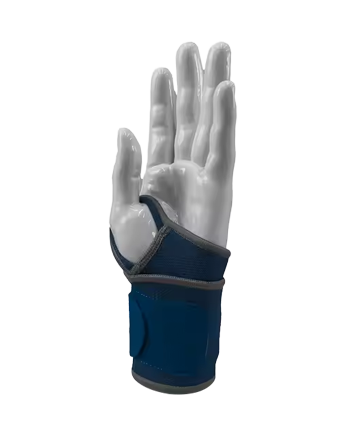
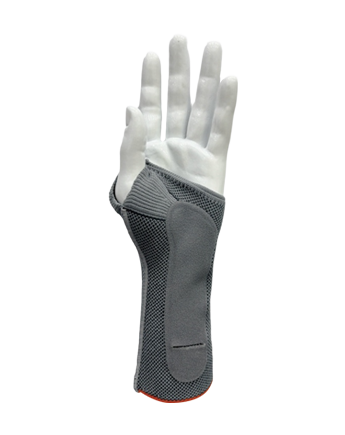
  • A structured stay or panel along the palm side of the wrist prevents full flexion and extension while still allowing moderate movement
  • Rigid stays on the dorsal side only (top of the wrist) are less effective for typing-related strain because the problematic positions for keyboard users tend to involve the underside of the wrist
  • The stabilization element should be positioned to limit the movements that cause strain, not simply wrap the wrist for the appearance of support

Palm padding and pressure distribution:

  • Targeted padding at the heel of the hand reduces the impact of resting the palm on a hard surface between keystrokes
  • Padding that extends across the thenar eminence (the fleshy base of the thumb) helps users whose thumb positioning during typing contributes to their discomfort
  • Overly thick padding raises the hand above the keyboard level and can worsen typing posture rather than improve it

Compression vs. Stabilization: Understanding the Difference

These two functions are often treated as interchangeable, but they address different aspects of typing-related strain.

Function Mechanism Primary Benefit When It Matters
Compression Applies gentle circumferential pressure Improves local circulation, reduces swelling, manages fatigue During and after long typing sessions
Stabilization Limits range of motion at the joint Prevents harmful wrist positions, reduces tendon loading During active typing, especially with history of strain
Combined Both mechanisms acting together Addresses both fatigue accumulation and positional stress Heavy daily keyboard use with existing discomfort

For many cases of typing-related strain, a device offering both functions at moderate intensity fits better than one providing strong immobilization or compression alone.

Ergonomic Design and Long Typing Sessions

The term ergonomic is applied to a wide range of products, but for hand supports used during typing work, it has a specific meaning.

A genuinely ergonomic design for this context:

  • Accommodates the slight natural arch of the hand without flattening it against a rigid surface
  • Does not restrict the metacarpophalangeal joints (the knuckles), since finger mobility is essential for typing
  • Allows the thumb to move freely across the space bar and modifier keys without being pulled into an unnatural abduction angle
  • Sits low enough on the wrist to avoid interfering with the forearm when the arm rests on a desk or armrest

The practical test: if wearing the support changes your typing form in a way that creates new discomfort in the fingers, forearms, or shoulders, the design is not appropriately calibrated for keyboard work.

When Should Someone Start Using Hand Support for Typing Work?

Waiting for pain to become severe before addressing it means the underlying tissue stress has already accumulated significantly. Earlier intervention generally produces better outcomes.

Consider using a support device when:

  • A dull ache or tightness in the wrist or palm appears consistently after long keyboard sessions and takes longer than an overnight rest to resolve
  • Numbness or tingling in the fingers occurs during or after extended typing, particularly in the thumb, index, or middle fingers
  • Grip strength feels reduced or unreliable compared to a few months prior
  • The discomfort has begun affecting sleep, particularly if it wakes you or causes you to change sleeping positions to avoid hand pressure
  • Typing sessions have increased in duration due to workload changes and the hands have not had time to adapt

Using a support device during this early-to-moderate phase, combined with breaks and posture adjustments, addresses the problem before it requires a longer recovery period.

Common Selection Mistakes That Reduce Effectiveness

The wrong product used consistently is not better than no product at all — and in some cases it can shift strain to adjacent areas.

  • Choosing a highly rigid immobilization brace for typing — Full immobilization devices are designed for injury recovery, not continued keyboard use. They restrict the finger extension needed for typing and force compensatory movement in the forearm.
  • Prioritizing appearance over function — Slim, minimalist designs may look appropriate for office wear but lack the structural elements needed to address wrist positioning during sustained typing.
  • Ignoring fit — A support that is too large slides during use, concentrating pressure at the wrong points. Too small and it restricts circulation rather than managing it.
  • Selecting a product designed for a different activity — Supports designed for weight lifting or contact sports prioritize dorsal protection and grip enhancement, not the neutral alignment and light stabilization that typing strain requires.
  • Assuming one hand is sufficient — Typing strain typically develops bilaterally over time. Many users address the dominant hand and neglect the non-dominant one, where strain accumulates more slowly but equally.

Matching Support Features to Specific Typing Environments

Different office and work contexts place different demands on the hands, and the appropriate support configuration varies accordingly.

Heavy keyboard, minimal mouse use (data entry, coding, writing):

  • Prioritize wrist alignment and palm padding
  • Moderate compression to manage fatigue across long continuous sessions
  • Designs that do not restrict rapid finger movement

Mixed keyboard and mouse use (design, administrative work):

  • The support needs to transition smoothly between keyboard and mouse grip positions
  • A shorter palm profile works better here to avoid interference with mouse handling
  • Adjustable compression that can be loosened slightly during mouse-heavy periods

Primarily mouse-based with intermittent typing (graphic design, editing):

  • The thumb and thenar region require more targeted support
  • Compression over the palm rather than strict wrist stabilization addresses the lateral pinch and grip forces involved in mouse control

Remote or home office use:

  • Wearability during casual mixed-use sessions matters
  • Breathability is particularly relevant if the home environment is warmer than a climate-controlled office

How Material and Build Quality Affect Daily Wear

Two supports with identical listed features can perform very differently based on materials and construction quality.

What to evaluate in construction:

  • Knit or mesh zones over the palm and between the fingers significantly reduce heat buildup during continuous wear
  • Reinforced seam lines at stress points prevent the structural elements from shifting or degrading after repeated donning and removal
  • Non-slip inner lining keeps the support positioned correctly throughout a full workday without requiring constant adjustment
  • Washability is a practical consideration that affects long-term hygiene and continued use — a support that cannot be cleaned easily tends to be worn less consistently over time

These construction details are not visible in product images but become apparent within days of regular use.

Frequently Asked Questions About Hand Support for Typing Strain

Can a Palm Brace Fully Stop Typing-Related Pain?

It reduces the mechanical stress that contributes to strain, but it works alongside — not instead of — breaks, posture adjustments, and activity management. It is a load-management tool, not a treatment.

Is It Safe to Wear One All Day While Working?

A well-fitted, breathable support designed for office use can be worn throughout the workday. Supports that cause numbness, skin irritation, or restrict circulation should be adjusted or replaced rather than worn through discomfort.

Does Wearing One Reduce Typing Speed?

A properly fitted support designed for typing tasks should not noticeably reduce speed. An overly rigid or ill-fitting device will.

Should It Be Worn Only During Work or Also at Rest?

Active typing time is where the focus lies. Some users with more significant strain also benefit from wearing lighter compression during rest or sleep, but the daytime typing period is more important.

Can It Be Used for Mouse-Related Strain as Well?

Yes, particularly designs with palm padding at the thenar region and adjustable compression. The relevant features differ slightly from those prioritized for pure typing use.

How Do I Know if the Fit Is Correct?

The support should feel secure without creating pressure points, the wrist should be held in a neutral position rather than forced into flexion or extension, and the fingers should be able to move freely through the full range required for typing.

Does Compression Help More Than Rigid Support for Typing Strain?

For many cases of typing-related strain, moderate compression combined with light stabilization addresses both the circulatory fatigue component and the positional stress component. Neither in isolation covers the whole picture.

Can It Prevent Strain from Getting Worse?

When used consistently with appropriate features, it reduces the daily accumulation of stress on the relevant tissues. This is not a guarantee, but it meaningfully changes the mechanical conditions that allow strain to progress.

Can Both Hands Be Supported Simultaneously?

Yes, and for heavy keyboard users, bilateral support often addresses the actual pattern of strain more accurately than single-hand use.

How Tight Should the Straps Be Set During Typing?

Firm enough to maintain wrist positioning without creating pressure on the tendons or veins — circulation should feel normal, not restricted.

Choosing Features Over Brand Names

The decision that matters a great deal when addressing typing-related strain is not which product to buy — it is which features the product must deliver. Neutral wrist alignment, managed compression, palm pressure distribution, and breathable construction are the functional requirements. Everything else is secondary. For buyers sourcing for personal use, for practitioners advising patients, or for procurement teams outfitting workplace wellness programs, the right question at every stage is whether a specific product's design actually delivers these features in a configuration suited to continuous office use. Zhejiang Steriger Sports Medicine Technology Co., Ltd. develops hand and wrist support products with ergonomic construction designed for the demands of daily keyboard and computer work, combining stabilization and compression in formats that remain wearable across full working sessions. Reaching out to their team allows buyers to discuss specific use cases, support configurations, and volume options that match the actual working conditions of the people the product is meant to protect.